
USB Port Instructions
⚠WARNING: To reduce the risk of serious personal injury, only connect one USB device at any time. Use ISM Lighting-approved cables for connection to the unit.
The USB port is located in the USB port and circuit breaker (22) area to the right of the On/Off & intensity buttons (20). This is a USB-C PD (Power Delivery) port that supports voltages needed for higher-power electronics, such as tablets and laptops. The maximum output is 100W. This port is always powered so simply plug your device into the USB-C port in order to use this output.
Switches (FIG. E)
Fig. E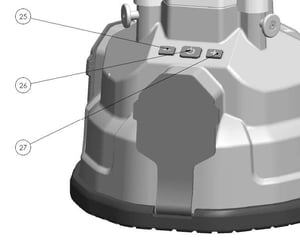
There are three switches used to control the LED mode and intensity. There are various LED panels inside of the bulb and these sections are split into two hemispheres so that the device can be operated in a single direction or in all directions. There is a fan in the device to inflate the diffuser when in use. This fan is not powered when the unit is in the Off mode but it is operational in all other modes.
The device does not have any memory so it will always begin at the same mode and power setting.
The Mode button (26) cycles between four different modes of LED operation:
-
Off: The LEDs are off.
-
On 180: The front half of the LEDs are enabled and remain on consistently.
-
On 360: All LEDs are enabled and remain on consistently.
-
On SOS: In this mode, all LEDs are enabled but they blink on-off at a rate of 1 second each.
The Intensity down (25) button decreases the intensity of the LEDs (no matter what mode) . If the LEDs are already on the lowest power setting then this button has no operation. There are five power settings.
The Intensity up (27) button increases the intensity of the LEDs (no matter what mode) . If the LEDs are already on the highest power setting then this button has no operation. There are five power settings.
AC Outlet and Circuit Breaker Instructions
⚠WARNING: To reduce the risk of serious personal injury, turn unit off the unit and unplug before making any adjustments or removing/installing attachments or accessories. An accidental start-up can cause injury.
⚠WARNING: To reduce the risk of serious personal injury, ALWAYS replace the protective covers when not in use.
⚠WARNING: Do not connect more than one device to the AC outlet. NEVER connect a multi-port surge protector or extension socket to the AC outlet.
⚠WARNING: To reduce the risk of serious personal injury, NEVER connect a device that uses more than 10A to the AC outlet.
There is an AC outlet (19) that can be used to power external devices. This outlet is a female NEMA-15 socket. There is a circuit breaker located in the USB port and circuit breaker location, under a protective cover. This circuit breaker is rated for 10A.
⚠WARNING: To reduce the risk of serious personal injury, ALWAYS turn off and unplug the unit before resetting the circuit breaker.
To reset the circuit breaker, simply press it in until it holds itself in place in the depressed position.